Personal Portfolio Website
Every request for a portfolio PDF meant reworking a document by hand, so for the convenience of everyone involved I decided to build a site that serves the portfolio on the web and auto-generates the PDF. Since I was building it anyway, I set a goal of handling everything solo — frontend to infrastructure to CI/CD.
Role: Solely responsible for the full stack: Next.js frontend, Puppeteer PDF generation, feedback notification system, Terraform IaC, and GitHub Actions CI/CD. My personal bar was 'one push deploys everything.'
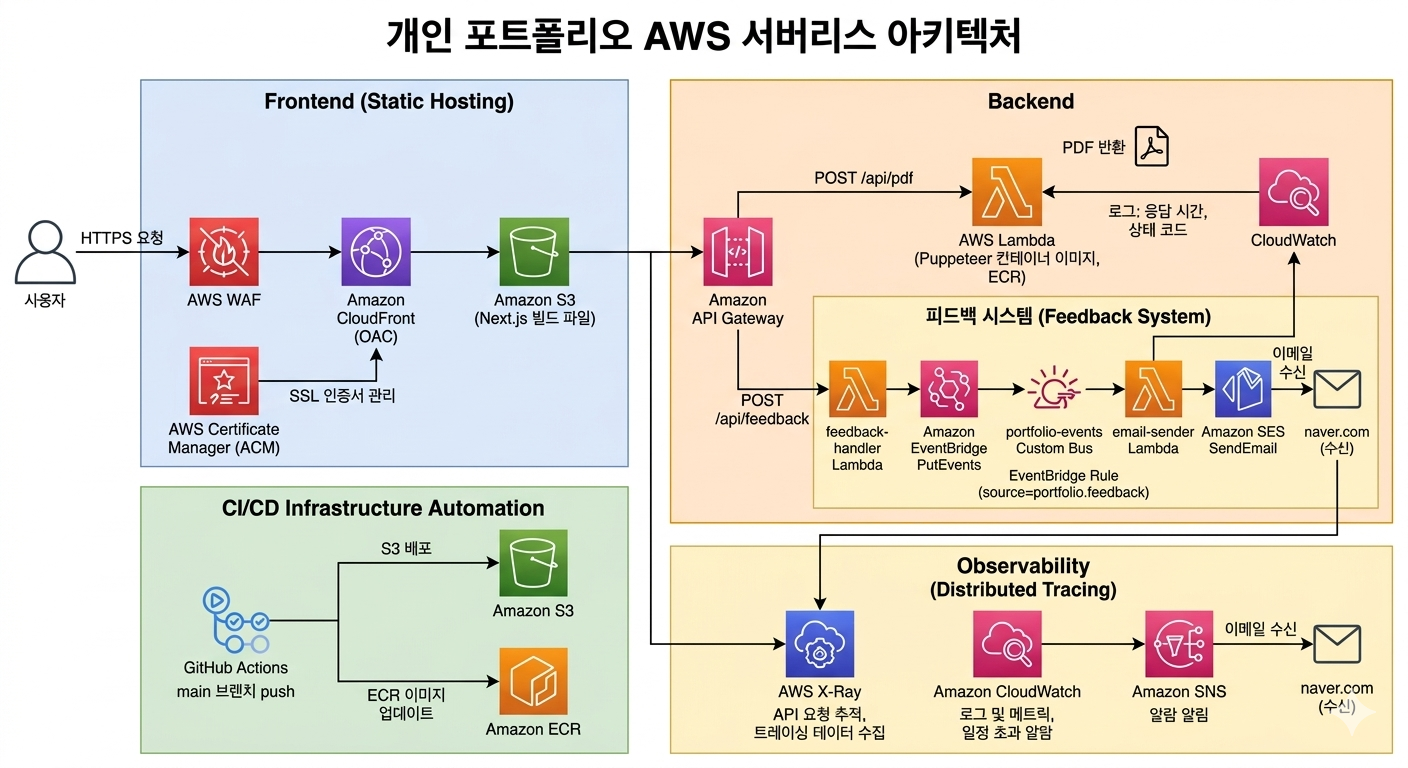
Static pages served via CloudFront (OAC) → S3. PDF generation and feedback submission go through API Gateway → Lambda. Feedback is loosely coupled to an email-sender Lambda via EventBridge. WAF, security headers, X-Ray, and CloudWatch alarms provide security and observability.
Design Rationale
Running a Next.js server on EC2 would have been simplest, but a portfolio site has almost no traffic — paying for an always-on server felt wasteful. I made static pages nearly free with S3+CloudFront and isolated only heavy, infrequent work (PDF generation) into Lambda. For the feedback system, I initially had the receiver Lambda send emails directly, but realized that adding Slack or DB storage later would mean modifying the Lambda every time. Decoupling via EventBridge means I can add new consumers just by adding Rules.
I was uncomfortable making S3 public, so I restricted access via OAC to CloudFront only. A global CDN might be overkill for a portfolio, but CloudFront's caching and HTTPS handling were convenient enough to include.
Browser printing (window.print()) produces a PDF too, but the output differs by device. Margins, page breaks, and whether background graphics are included all depend on what the user picks in the print dialog — and on phones the result varies by browser with no way to control it. This is a résumé-style document, so it had to come out identical no matter who downloaded it or where, which meant moving rendering from the client to the server. With a pinned Chromium version, pinned fonts, and fixed print options, the output converges on exactly one result. On the implementation side, Puppeteer's Chromium binary exceeds 250MB and broke the ZIP Lambda size limit (50MB), which the container image Lambda solved. At a few requests per day, it is far cheaper than running a server.
I could expose Lambda URLs directly, but adding auth or rate limiting later requires API Gateway. X-Ray tracing integrates here with a single toggle.
If the receiver Lambda sends emails directly, adding Slack or DB storage means modifying Lambda code each time. EventBridge lets me add new consumers with just a Rule — no code changes needed.
With 10+ resources (CloudFront, S3, WAF, Lambda...), manual console management would inevitably lead to 'why is this configured this way?' Defining everything as code preserves intent in version history and makes the entire environment reproducible.
Manually running build → S3 upload → cache invalidation kept leading to missed steps. Automating the full flow on push eliminated deployment mistakes entirely.
- Issue
- Korean text rendered as □□□ when generating PDFs with Puppeteer on Lambda.
- Analysis
- Chromium uses system fonts, and the Lambda container had no Korean fonts at all. It worked locally but broke on Lambda — I initially suspected an encoding issue, but the root cause was missing fonts.
- Solution
- Bundled Noto Sans KR into the container image and added waitForFunction on document.fonts.ready before PDF capture. Relying on an external CDN could break again depending on network conditions, so bundling was the safer choice.
- Result
- Korean renders consistently, and bundling fonts guarantees identical results regardless of the runtime environment.
- Issue
- After deployment, clicking back/home from a project detail page redirected back to the project page instead of home.
- Analysis
- The problem was applying immutable caching to all static files — including Next.js RSC payloads (.rsc), which also got long-cached. The browser kept referencing stale routing data. My naive assumption that 'all static files can be cached forever' was the root cause.
- Solution
- Split Cache-Control by file type during S3 upload: no-cache for HTML and RSC payloads, immutable only for content-hashed JS/CSS.
- Result
- Routing issue resolved. Hashed assets still benefit from long-term caching.
What stayed with me most is how completely different 'working' and 'operable' turn out to be. Getting the static site onto S3 and rendering was quick; the WAF, X-Ray, and CloudWatch alarms I added afterward took far longer. Not a single feature came out of that work, and I kept wondering why I was still on it — until an alarm told me a deploy had broken before any visitor noticed. Observability and defense aren't nice-to-haves; they're closer to the precondition for operating anything at all.
Terraform started as one file holding everything. As resources piled up I lost track of what changed when I touched one thing, and only then did I split it into role-based modules — acm, s3, cloudfront, lambda, waf. Would it have been better to structure it that way from the start? I don't think so. I could only explain my own criteria for splitting modules after living through a file that had outgrown itself.
Generating the PDF on the server came from the same place. Browser printing produces a PDF, but only after the user has matched up margins and background options in the print dialog themselves. I once needed to send one from my phone in a hurry and the file that came out didn't match what I'd produced on my laptop — and for a résumé-style document, it should be the same file no matter who downloads it or where. The only way to get there was moving rendering from the client to the server, which is why Lambda and Puppeteer are in this project. It wasn't about adding a feature; it was about collapsing the output to one result.
The price of that choice is cold start. The first request takes close to 10 seconds, and I know Provisioned Concurrency would fix it. But do I pay a standing cost on a site with almost no traffic, or let the occasional first visitor wait 10 seconds? I haven't settled that with myself yet. This smallest of my projects was where I first ran into cost and user experience colliding head-on with no clean answer.