Personal Portfolio Website
Build and operate a personal portfolio platform using a fully serverless architecture with automated deployment, observability, and security controls.
Role: Solely responsible for the entire lifecycle: Next.js frontend, Puppeteer-based PDF generation, EventBridge + SES feedback pipeline, Terraform IaC, and GitHub Actions CI/CD. Progressively added security (WAF, OAC, HSTS) and observability (X-Ray, CloudWatch, SNS) layers.
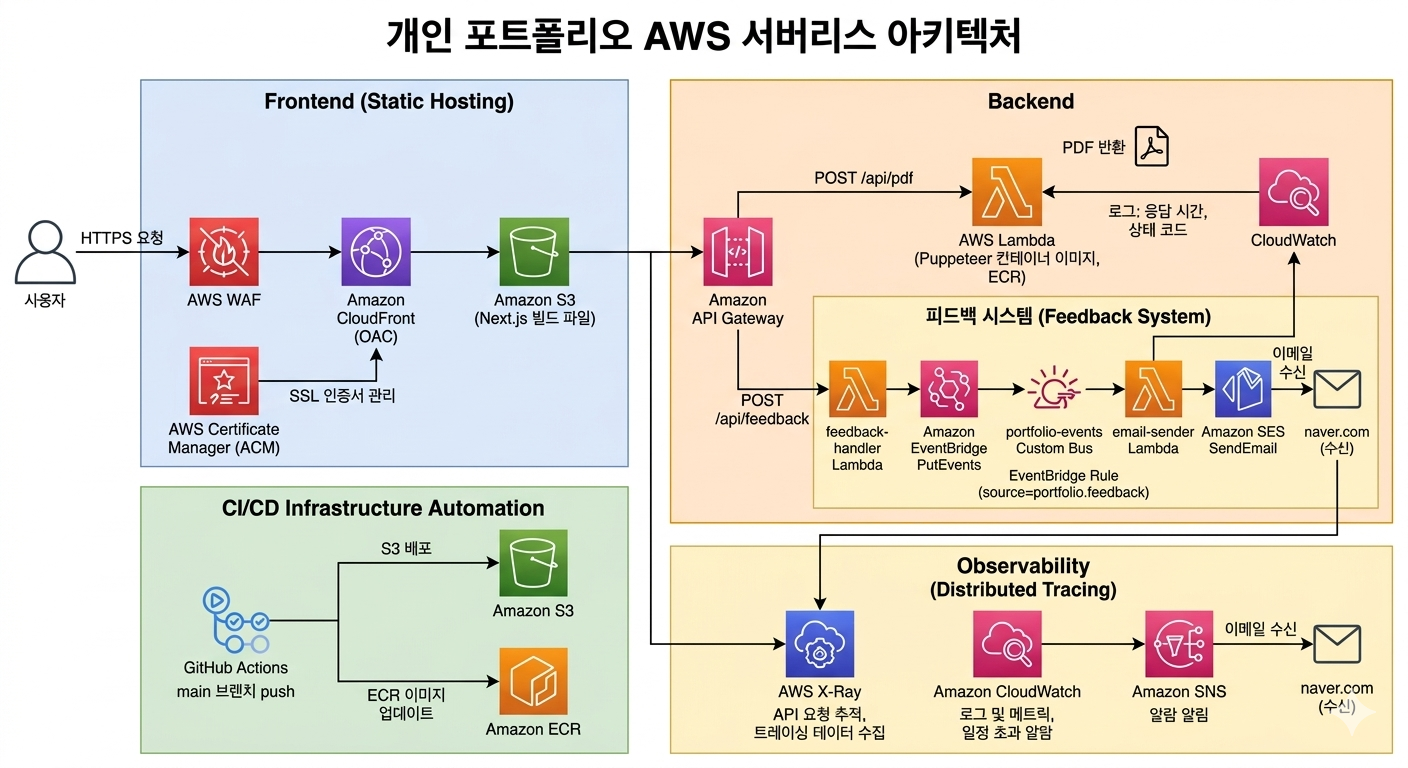
Users receive static pages via external DNS (CNAME) → CloudFront (OAC) → S3. PDF download requests are handled through API Gateway → Lambda (Puppeteer). Feedback submissions flow through API Gateway → Lambda (feedback-handler) → EventBridge (portfolio-events) → Lambda (email-sender) → SES, delivering visitor feedback as real-time email notifications. WAF is placed in front of CloudFront for L7 security, and a Response Headers Policy automatically injects HSTS, X-Frame-Options, and other security headers on all responses. ACM manages HTTPS certificates. The PDF Lambda runs as an ECR container image; the feedback Lambda runs as a zip package. X-Ray provides distributed tracing from API Gateway to Lambda. CloudWatch dashboards and SNS alarms detect Lambda errors, duration, throttling, and API Gateway 5xx in real time. GitHub Actions automates S3 upload → CloudFront cache invalidation for frontend changes, and image build → ECR push → Lambda function update for backend changes.
Design Rationale
Heavy, infrequent workloads like PDF generation are offloaded to Lambda to minimize operational cost without a persistent server. Static content is served globally via CloudFront + S3, with only server-dependent features attached as serverless functions — achieving simplicity and cost efficiency simultaneously. All infrastructure is codified with Terraform for reproducibility and change history management.
App Router-based static generation (SSG) is optimized for S3 deployment, and TypeScript ensures type-safe data structure management. Compatibility with Tailwind CSS v4 was also a factor.
CSS-first configuration allows custom themes to be defined directly in globals.css without a config file. Dark mode support is straightforward with class-based toggling.
S3 is kept private with OAC (Origin Access Control), allowing access only through CloudFront for enhanced security. External DNS is managed via a third-party provider and connected to CloudFront via CNAME.
Applied managed rule sets to block common web attacks such as SQL injection and XSS — ensuring a baseline security layer even for a personal portfolio.
Puppeteer requires a Chromium binary that exceeds standard Lambda package size limits. Deploying as a container image Lambda resolves this constraint. Since PDF generation is infrequent, Lambda is more cost-efficient than a persistent server.
Placed API Gateway in front of Lambda (instead of direct CloudFront invocation) to facilitate request routing, auth extension, and X-Ray tracing integration.
Managing Lambda container images in AWS's internal registry minimizes deployment latency and systematizes image version control.
Introduced to visualize Lambda cold start latency and Puppeteer rendering bottlenecks that are difficult to identify from simple error logs alone.
All resources — CloudFront, S3, WAF, API Gateway, Lambda, ECR, ACM, IAM — are defined as code, maintaining a reproducible infrastructure without manual console operations. Modularized for per-environment extensibility.
On code push: Next.js build → S3 upload → CloudFront cache invalidation, and Lambda image build → ECR push → Lambda function update are fully automated, eliminating manual deployments.
CloudWatch Alarms detect Lambda errors, duration threshold breaches, throttling, and API Gateway 5xx — with immediate SNS email notifications. Dashboards provide at-a-glance visibility into invocation trends and latency for faster incident response.
Applied HSTS (2 years), X-Frame-Options, X-Content-Type-Options, XSS-Protection, Referrer-Policy, and Permissions-Policy to all responses using AWS managed policies — completing the security layer without CloudFront Functions or ongoing maintenance.
Instead of directly chaining the feedback-receiver Lambda to the email-sender Lambda, an EventBridge custom bus decouples the two. This enables future additions — Slack notifications, DB storage, etc. — by simply adding new Rules without modifying existing code. Email is sent from the custom domain (eomkyeongmun.me), DKIM-verified via SES for sender credibility.
- Issue
- Korean text rendered as □□□ when generating PDFs with Puppeteer on Lambda.
- Analysis
- Puppeteer's Chromium relies on system fonts. The Lambda runtime environment (Amazon Linux 2) does not include Korean fonts by default, causing Chromium to output □ for Korean characters.
- Solution
- Bundled Noto Sans KR font directly into the Lambda container image Dockerfile. Also loaded the font via Google Fonts on the /portfolio/print page and added waitForFunction in Puppeteer to wait for font loading to complete before capturing the PDF.
- Result
- Korean fonts now render correctly, with all text displaying properly in the generated PDFs. Bundling fonts into the image ensures consistent output without external network dependency.
- Issue
- After deployment, clicking the back button or home link on a project detail page redirected back to the project page instead of the home page.
- Analysis
- Next.js App Router client navigation fetches RSC (React Server Component) payload files for server component rendering. However, GitHub Actions applied Cache-Control: public, max-age=31536000, immutable to all static files uploaded to S3 — including RSC payload files under _next/static/. Even after CloudFront cache invalidation post-deployment, previously cached RSC payloads in the browser referenced stale routing information, causing incorrect navigation.
- Solution
- Separated Cache-Control settings in the S3 upload step: applied no-cache to HTML and RSC payload files to always reference the latest version, while keeping immutable for content-hashed JS/CSS files to preserve cache efficiency.
- Result
- The post-deployment page navigation issue was resolved. RSC payloads always reference the latest server component output, while static assets retain their long-term cache behavior.
- Issue
- After pushing a Lambda container image to ECR via GitHub Actions, the Lambda function sometimes failed to reflect the new image.
- Analysis
- Even after pushing a new image with the latest tag to ECR, Lambda continues using its previously cached image unless the function configuration is explicitly updated. An API call to update the function is required for Lambda to recognize the new image.
- Solution
- Added an aws lambda update-function-code step after the ECR push in the GitHub Actions workflow to force Lambda to reference the latest ECR image on every deployment.
- Result
- Lambda is now always updated to the latest image on every code push. Changes are reflected immediately with no missed deployments.
⚙ Improvements
Built an entire service end-to-end — from frontend development through serverless backend, IaC, and CI/CD — making all the connections myself. Progressively added production-grade security and observability layers: S3 OAC, WAF, X-Ray, CloudWatch alarms, and security header policies, delivering a structure that goes well beyond simple deployment.
△ Regrets
Lambda cold start latency on the first PDF generation request can be noticeable, but I didn't thoroughly evaluate applying Provisioned Concurrency. The Terraform module structure also became more complex than initially designed and needs refactoring.
→ Next Steps
Planning to reduce cold start with Lambda Provisioned Concurrency or SnapStart, and add anomalous traffic detection tied to CloudWatch alarms. Will extend the feedback system by adding EventBridge Rules for Slack notifications or DB storage, and refactor Terraform modules into reusable per-environment structures.